
Google Business Profile Management for Contractors, You Own It
Your Google Business Profile, set up the way Google asks and kept current every month, while you stay the owner.
5.0on Google- Google Partner
- Meta Business Partner
When we audit Google Business Profiles for contractors, we often find one someone set up years ago and never touched again. Wrong categories, an old phone number, a home address showing and no reply on the last bad review.
Good management means fixing that once and keeping it fixed, so the profile brings in calls instead of sending them to the roofer down the road. And you stay the primary owner, so you never have to ask anyone for it back.
The short answer: GBP management is the ongoing work of keeping your free Google profile accurate, complete and active. That means correct name, categories and service areas, a full services list, fresh job photos and posts, a reply to every review and a monthly check on calls.
Key takeaways
- The profile is free. You pay a manager for the time it takes to keep it right, including Google’s own edits. What it includes
- If customers don’t come to you, hide your address and set up to 20 service areas within about 2 hours of driving. Contractor rules
- Services, towns or taglines stuffed into your business name can get the profile suspended. The name rule
- Calls and website clicks are the numbers to judge by. Directions mean little when you drive to the customer. How we measure it
- Add any manager as a Manager, not an Owner, so you keep control of users and the profile. Keeping your profile
- Google itself warns against anyone who guarantees a ranking or claims to work for Google. Google’s warning signs
What Google Business Profile management for contractors includes
The profile itself is free. Google says you can manage how your business shows up on Maps and Search at no charge. What costs money is the time: keeping every field right, adding photos and posts, answering reviews and catching the edits Google makes on its own.
Google also edits profiles itself, using user reports and licensed content. Its changes show in blue in the profile editor. When a user suggests an edit that needs your review, you get 4 days to accept or reject it. Miss the window and Google may publish it anyway if other public info backs it up.
None of it is exciting, which is why it usually doesn’t get done. For a contractor, it comes down to six jobs:
- Accuracy. Name, phone, website, categories and service areas match the real business, and hours match when you really answer, including 24 hours if you take 2 a.m. emergency calls.
- Services. Every job you want more of is listed, in words customers use.
- Photos and posts. Real job photos every month and a post every week.
- Reviews. A steady way to ask, and a reply to every new review.
- Watching. Catching Google’s edits, rejected changes and suspension risks early.
- Reporting. Calls, website clicks and the searches that found you, every month.
What it isn’t: a ranking you can buy. Google’s local results are mainly based on relevance, distance and how well known the business is. A manager works on the first and third. Nobody can move your shop closer to the customer.
If you’d rather do it yourself, that’s a fair call, and our step by step setup guide walks through every field. This page is for owners who’d rather hand it off.
Why a contractor’s profile plays by different rules
Most GBP advice is written for shops with a front door. You work out of a truck, and Google has a separate set of rules for that. Get them wrong and your profile can drop out of searches or get suspended.
Your address and service areas
Google calls you a service-area business if you go to customers but don’t serve them at your address. Plumbers are Google’s own example. If that’s you, take the address off the profile. Nobody needs your kitchen table on Google Maps.
Then you set where you work. Google’s limits:
- Up to 20 service areas, set by city, ZIP code or other named area.
- No radius. You can’t set a circle around the shop.
- The whole area shouldn’t run more than about 2 hours of driving from where you’re based.
- One profile for the whole area. A service-area business can’t have a profile per town.
We pick the towns you want work in, not every town you’d drive to. No permanent sign at your shop? Then Google says it isn’t eligible as a storefront and belongs under service-area business. Our guide to service area business setup goes deeper on hybrid setups, like a remodeler with a showroom.
Running more than one territory, like a restoration franchise? Google’s rule is that a service-area business should have one profile for the central office, and can’t list a “virtual” office unless it’s staffed during business hours. Our read: a second territory only gets its own profile if it has its own real, staffed office. If each territory is its own franchise with its own license, it’s its own business with its own profile. Extra profiles for towns you only drive to are out.
Your business name and categories
This is where we see the most risk. Google’s guidelines say adding unnecessary info to your business name isn’t allowed and could get the profile suspended. Service words and location words are on the list. So “Your Roofing Co.” (a made-up name) is fine if that’s the name on your truck, your sign and your invoices. “Your Roofing Co. Roof Repair Stamford” isn’t, even if a competitor gets away with it for now. We’d rather you have a plain name than a suspended profile.
Categories work the other way. Google wants as few as it takes, as specific as possible, and never used just as keywords. Google’s test: pick categories that finish the sentence “This business IS a,” not “this business HAS a.” A roofer is a roofing contractor. Gutter work goes in services, unless gutters are a real part of what you sell.

Getting verified when you work from a truck
Google picks the verification method, and you can’t change it. If video is offered, Google recommends it. The verification video has to be live, unedited and at least 30 seconds long. Pre-recorded clips aren’t allowed.
In that one take you show three things. Where you’re based: street signs or landmarks, and if you work from home, your neighborhood counts. That the business is real: your tools, your equipment, a branded van or shirts. That you run it: opening up the branded van, or a permit, invoice or utility bill with the same name as your profile. Keep other people’s faces out of it.
If Google verifies by call or text, take it yourself on a line a person answers. Google says phone menu systems won’t get the code, so if Restoral or any answering service picks up your main line, we switch it off or forward to your cell for that call.
We script the video with you first, so you get it in one take.
What our Google Business Profile management covers
You keep the profile. We do the work inside it.
Google Business Profile cleanup and verification
We check every field against Google’s rules and your real business, then fix it in this order: any suspension, then access and verification, then duplicates, then the name, categories, address, hours and phone.
Verification comes early because Google says verified profiles are more likely to show up in search.
Services and service areas
Google offers suggested services by category. Its own example is a plumber getting options like “Install faucet” or “Repair toilet”, and you can add custom ones. We add the jobs you want more of, each with a short description. We leave prices and phone numbers out of custom service names, because Google’s rules say to.
When a customer reviews a service business, Google may ask them which service they got, picked from your list or from common jobs in your trade. A complete list means reviews get tagged with the job you actually did.
Two more fields matter: the description and the attributes. The description can’t include links and shouldn’t focus on promotions or prices, so offers go in posts instead. Google can also suggest an AI-written description. We treat that as a rough first draft and check every line. Attributes are the yes-or-no details, and Google says that with certain ones, your business might show up in searches for places with them.
Photos and Google posts
We add real job photos on a schedule: the crew, the truck, the work in progress, the finished job. Google asks for photos that represent reality, with no heavy filters, so phone shots from the job site work fine.
Posts come in three types: Update, Offer and Event. Google lets you schedule them and set them to repeat. We tie them to your season and your trade: storm damage checks for a roofer after a hail week, furnace tune-ups for an HVAC shop before the first cold snap, frozen pipe and water damage checks for a restoration company before the first hard freeze. An example HVAC Update post we’d write:
“First cold night is coming. Book a furnace tune-up this week and our tech checks the burners, the flame sensor and the filter before you need heat. Tap Call to grab a morning slot.” It goes out with a photo from a real tune-up.
We use the Call now button instead of typing a number in the post, because Google may remove posts with unverified contact info.
Reviews and review replies
We set up a simple way for your crew to ask every customer, with a short link or QR code, the way Google suggests. Our review link generator makes one free.
We never offer a discount or gift for a review. Google calls that fake content. A profile caught at it can be blocked from new reviews, have its existing reviews hidden for a while, or show a warning that fake reviews were removed.
Say a customer leaves two stars because the tech showed up late. Our reply would read something like: “You’re right, we were an hour late on your Tuesday repair and should have called ahead. Thanks for telling us. Call the office and ask for the owner, and we’ll make it right.” Anything under 4 stars, we check the facts with you before we reply. You can see more on how we reply to reviews, good and bad.
Website and service pages
The profile links to one page, so we make sure it’s the right one and loads fast on a phone. If a service has no page of its own, we’ll tell you, and building new pages is separate work we quote on its own.
Call tracking and reporting
We don’t swap your number for a tracking number on the profile. Google wants a local number under the business’s direct control, and we don’t want your main line depending on a vendor.
Google’s Calls number is a count, not a list of callers, so we line it up against your job log month to month. We also tag the website link so profile visits show up on their own line in your analytics.
Answering and booking
Google turned off Business Profile chat on July 31, 2024, so for most contractors the profile’s main job is the phone call. Some eligible profiles can still get texts or WhatsApp messages, and we check whether yours can.
If more calls come in, someone has to pick up. Restoral, our own AI system, answers calls and website chats and books jobs onto your calendar. It works with Google Calendar, Calendly, Cal.com, Jobber and most trade CRMs, and our team sets up the integration.
Before and after: a managed contractor profile
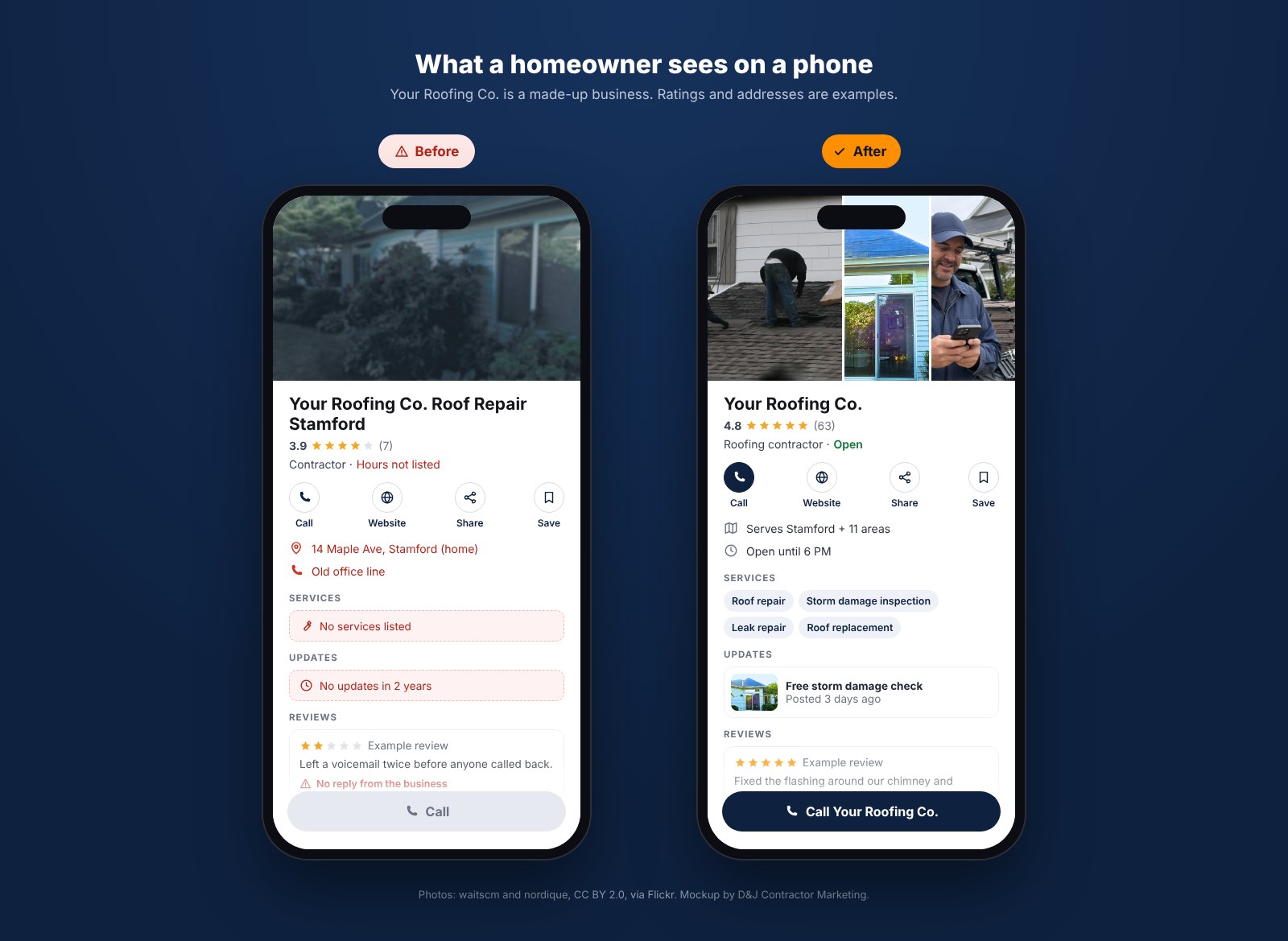
Below is a made-up roofer, Your Roofing Co., the way we often find a contractor profile and the way it looks after a few months of steady work. The business, the reviews and the numbers are examples, not a real client.
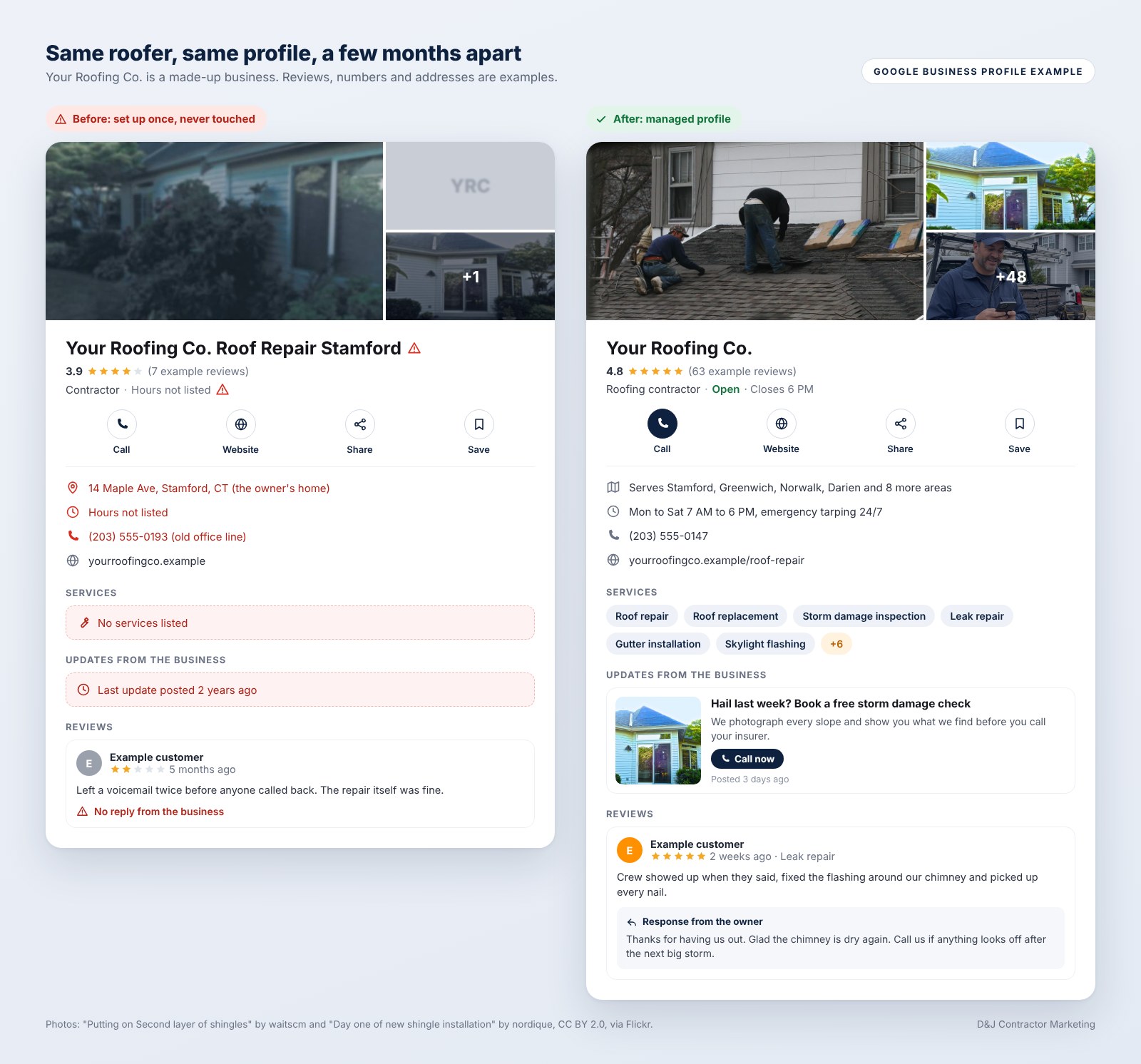
What changed:
| Field | Before | After |
|---|---|---|
| Name | Your Roofing Co. Roof Repair Stamford | Your Roofing Co. |
| Address | Owner’s home address showing | Hidden, with named service areas |
| Categories | Contractor, General contractor, Gutter service, Siding contractor, Painter | Roofing contractor, plus Siding contractor if you really sell siding |
| Services | None listed | Roof repair, roof replacement, storm damage inspection and more, each with a short description |
| Photos | 3 old photos, one blurry logo | Fresh job photos added every month |
| Posts | Last one two years ago | A post every week, tied to the season |
| Reviews | No replies, nobody asking | A link and QR code on every job, every review answered |
| Website link | Homepage, no tracking | Main service page (or the homepage if you sell several trades), tagged link |
The name, address and category fixes come from Google’s guidelines. The rest is how we keep a profile active.
The GBP management checklist we run
After the first cleanup, it’s a short list of jobs on a schedule, so nothing goes stale. This is the cadence we run for a single-location contractor, and busy seasons get more posts and photos than slow ones. We time the quarterly review of services and service areas for your slow season. Facebook and Instagram can run from the same calendar with our contractor social media marketing.
| How often | What we do | Why it matters |
|---|---|---|
| Twice a week | Check suggested edits, reply to new reviews | Edits have a short deadline, and a bad review shouldn’t sit for a week |
| Weekly | Publish or schedule a post | A dead profile looks like a closed business |
| Monthly | Add new job photos, check hours and holiday hours, send the report | Keeps the profile current and shows what came in |
| Quarterly | Review categories, services, service areas and the description | You add services and drop towns, and the profile has to keep up |
| As needed | Fix rejected edits, duplicate listings and access problems | A rejected edit leaves wrong info live, and a duplicate splits your reviews |
We write down every change before we make it, including the old value of every field we touch, so we can put it back exactly if Google pushes back or a ranking slips. We make one big change at a time, not five, so we know which one caused a problem.
The name, address and categories get the most care, since that’s where Google’s guidelines spell out the strictest rules. Then we wait. Google reviews edits before they go live, and it doesn’t publish a set time for name or category changes, so we check the profile until the change shows. Attribute edits and review replies usually clear in about 10 minutes, but some take up to 30 days.
Watch for fake “Google” calls too, the kind that sound official and want money to keep you listed. Google does sometimes call or text to confirm your hours or services. That part’s real, and those calls are worth answering because the answers end up on your profile. But Google will never ask for payment to keep you on Google. If a caller wants money for that, it isn’t Google. Hang up. We say it on day one.
How we measure it: calls, not views
Google’s performance report gives every verified profile a set of numbers. This is how we read each one for a contractor:
| Google metric | What Google counts | How much it matters to a contractor |
|---|---|---|
| Calls | Taps on the call button on your profile | The main number. It is the closest thing to a lead on the report. |
| Website clicks | Clicks on the website link | High. We follow these to quote requests on your site. |
| Searches | The search terms people used to find you | High. Shows which jobs the profile shows up for. |
| Views | How many people viewed your profile on Search and Maps | Medium. If views double and the phone doesn’t ring more, we treat that as a problem, not a win. |
| Directions | Requests for directions to your business | Low for a service-area business, since customers don’t come to you. |
| Messages and bookings | Message threads, and bookings made through a booking provider | Only if you have them set up. |
If you only look at one line, make it calls. Google’s numbers include views and actions from both organic results and Google Ads, so if you run ads, part of that count came from them. And a tap on Call isn’t a booked job. Some are wrong numbers or sales calls.
Where we can, we match profile calls and form fills to the jobs in your CRM or calendar, so the report can say how many came from the profile and turned into real work. If you don’t use a CRM yet, a simple “how did you hear about us” question on every call gets you most of the way.

Your report fits on one page. It shows calls, website clicks and the top searches for the month, compared with last month and the same month last year when Google has it. It lists what we changed and what we’re doing next. If a number dropped, we say so and say why we think it did.
How to hire a GBP manager and keep your profile
A problem we see a lot: the agency owns the profile, so when you part ways, they keep it. Stay primary owner, whoever you hire. That includes us.
Google has two roles. Owners have full control. Managers have mostly the same access, except they can’t add or remove users or remove the profile. A profile can have several owners but only one primary owner. That should be you.
- Go to your Business Profile.
- Select More, then Business Profile settings, then People and access.
- Select Add and enter the email your manager gives you.
- Under Access, pick Manager, then select Invite.
Nobody needs your password. Each person signs in with their own Google Account. Also know the 7-day rule: a newly added owner waits 7 days before they can delete the profile, remove users or transfer primary ownership. Managers can’t do those at all.
If someone else set the profile up, like an office manager on her own Gmail, have her add you as an owner, then make you primary owner. If she wants to stay on, switch her to Manager in People and access.
Already stuck with an old agency as primary owner? Ask them in writing to add you as an owner and hand over primary ownership. If they won’t, request ownership through Google. The current owner gets an email and has 3 days to respond. If they deny it, you can appeal. If they don’t answer in 3 days, you may get the option to claim the profile. We walk you through every step.
If you ever stop working with us, you remove us on the same screen, and the replies and posts we made stay on the profile. The services and terms are in writing before you sign.
Google’s own warning signs
Google has its own page on working with third parties. Its red flags:
- They won’t show you your numbers. Google calls it a lack of transparency. Google says you have the right to know your profile’s performance.
- They guarantee a ranking. Google says third parties can’t promise or directly influence your rank on Search or Maps through any special means.
- They claim to work for Google. Ask them to email you from an @google.com address.
- They make threats. No third party can remove your business from Google or get into your profile without your permission.
- The pricing is unclear. Google says to get an official copy of your agreement that spells out the services and their costs.
Google also suggests working with one third party at a time. Two agencies on one profile undo each other’s work.
What we won’t do
We won’t stuff keywords or towns into your business name. We won’t set up a fake address or a second profile to cover another town. We won’t buy reviews, trade discounts for them or post them for you.
Those tricks can work for a few months. Then the profile can get suspended, and you’re the one who loses the calls. If your profile is suspended when we start, we hold other edits until it’s live again. Our guide on how to get a suspended profile back walks through that process.
What the first 90 days look like
Some fixes show up within minutes. Others sit in Google’s review queue for days or weeks, so we plan the order around that.
Month 1: Access, audit and fixes
You add us as a manager. We audit every field, check for duplicate profiles and look at the profiles that beat you in your main towns. Then we fix things one at a time in the order above: any suspension, access and verification, duplicates, then name and categories, address, service areas, hours and phone. We also set up the tagged website link and agree on the jobs you want more of.
Month 2: Services, photos and reviews
We build out the services list, add the first batch of job photos and start the post schedule. Your crew gets the review link and a short script for asking at the end of a job. Our post on how to ask for reviews has the wording we use. We start replying to every new review.
Month 3 and on: The first real report
Now there’s a baseline to report against. We look at which searches bring calls, which services get viewed and what customers mention in reviews. That might lead to a new service page, more photos of one job type, or a closer look at a town where you’re not showing up. For the bigger ranking picture, our guide on how to rank higher on Google Maps covers the work beyond the profile.
Be wary of anyone who promises the map pack in 30 days. A messy profile can pick up calls soon after the cleanup, but a crowded market takes months of reviews and website work on top.
Why work with D&J
We’re a marketing agency for contractors and home service businesses, based in Stamford, Connecticut.
- We’re a Google Partner, a Meta Business Partner and a Yelp Partner. Google Partner is an ads program, and we don’t work for Google.
- We’ve worked with 30+ SERVPRO franchises, and we’ve never lost a SERVPRO client.
- We run the rest of the local picture too: contractor SEO, Local Services Ads, websites and reviews. So the profile, the site and the ads all say the same thing.
- We built BuilderBase, our own app that writes your posts with AI and posts them to your social pages and your Google Business Profile.
What to do this week
You don’t need us to start. Five things to do this week, in order:
- Open People and access and check who owns your profile. If it isn’t you, fix that first.
- Read your business name out loud. If it has a service or a town in it that isn’t on your truck and invoices, take it out, then expect Google to review the change before it shows.
- If customers don’t come to you, hide your address and list the towns you actually want work in.
- Add five job photos from the last month.
- Reply to the last three reviews you skipped.
Our free local SEO audit checks 23 local SEO factors on your website in about 30 seconds, including whether the site links to your Google Business Profile. It looks at the website, not the profile itself. For the profile, we go through it with you on a strategy call. For the bigger picture, see our guide to local SEO for contractors.
Google Business Profile management FAQ
How much does Google Business Profile management cost?
The profile itself is free to use. What you pay for is someone’s time each month, so the price depends on the work: one location or several, and how messy the profile is when we start. We quote after we go through your profile with you on a strategy call, and we put the services and the price in writing, the way Google advises.
Is Google Business Profile management worth it for a small contractor?
It’s worth it if the profile is costing you calls and you won’t keep it up yourself. Plenty of one-truck owners handle it themselves. Hand it off when reviews sit unanswered, photos are years old or nobody’s watching Google’s edits. Judge it by the calls in your monthly report.
Will I still own my Google Business Profile?
Yes. You stay the primary owner and add us as a manager, so you can remove us any time from People and access. The steps are in the hiring section above.
Can you guarantee I’ll show up in the map pack?
No, and nobody honest can. Google says there’s no way to request or pay for a better local ranking, and it lists guaranteed placement as a warning sign when hiring a third party. What we can do is make the profile complete, accurate and verified, and keep reviews coming in. Those are the things Google says help.
Should my business address show on Google?
Only if customers come to you. If you go to them, Google treats you as a service-area business and says to remove the address. You then list the towns or ZIP codes you serve, within Google’s limits for service-area businesses.
How long until I see more calls from my profile?
It depends on how far off the profile was and how crowded your market is. The 90-day plan above shows what happens when, and we’ll give you our honest read after we see your profile.