
Social Media Marketing for Contractors, Built on Real Jobs
Posts built from your real job photos on Facebook, Instagram and Google, with comments answered and results tracked to calls, not likes.
5.0on Google- Google Partner
- Meta Business Partner
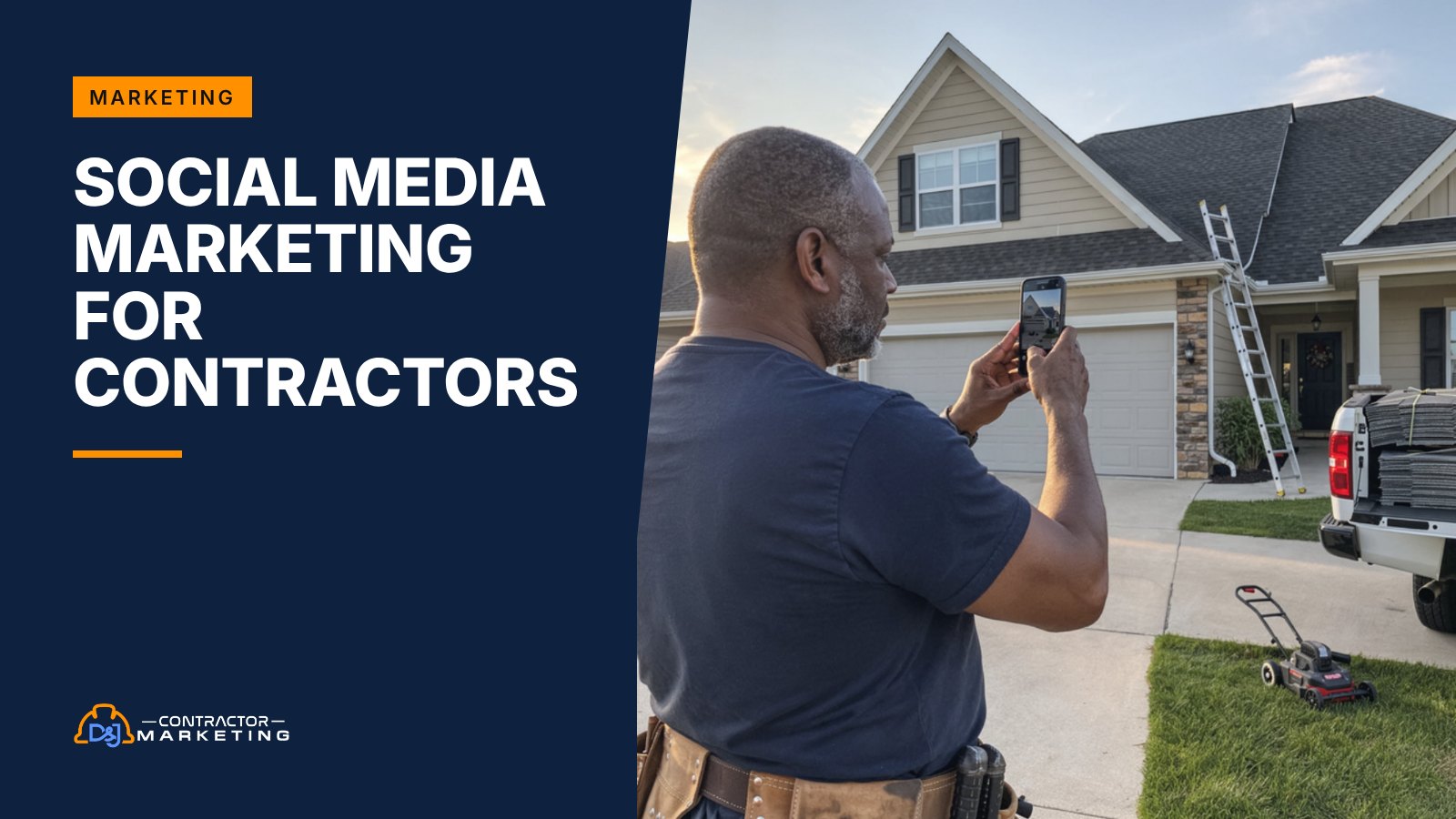
A homeowner hears your name from a neighbor. Before they call, they look you up. If your Facebook Page’s last post is from two summers ago, that’s a small reason to call the next company instead. Post one real job a week and that problem goes away.
We offer social media marketing for contractors that’s built on those jobs. We write and schedule your posts on Facebook and Instagram, plus weekly updates on your Google Business Profile. We answer comments and messages, and we track it all to calls and quote requests instead of likes. You keep owning every account. Your crew’s only job is to snap a few photos.
In short: good contractor social media is two or three posts a week built from real job photos, each naming the town, the problem and the fix, with one clear next step. Add a weekly Google Business Profile update, answer every comment and message, and judge it by calls and quote requests, not followers. And skip bought followers. Knowingly buying fake ones to look bigger breaks the FTC’s 2024 rule (16 CFR 465.8).
Key takeaways
- Social is proof for people who already heard your name, not a replacement for search when a pipe bursts. What it does
- Pew’s 2025 surveys found 71% of U.S. adults use Facebook, and 58% of people 30 to 49 visit it daily. Which platforms
- Every good post has four parts: a real photo, the town, the problem and fix, and one next step. Example posts
- We plan, write, post and reply for you, including weekly Google Business Profile updates. What we cover
- Knowingly buying fake followers breaks the FTC’s rule 16 CFR 465.8, and staff testimonials need a clear label. Shortcuts we skip
- We track social with UTM tags and tracked numbers. Google gives no click data for the social icons on your profile, so we don’t rely on them. How we measure
- Prefer to do it yourself? BuilderBase starts at $29 a month with a 7-day free trial. Do it yourself
What social media marketing for contractors actually does
Social media won’t make the phone ring at 2 a.m. when a pipe bursts. People in a hurry search Google. What social does is back up everything else you do. It proves you’re real and that you do good work, to the people who already heard your name.
Your best jobs usually start with a neighbor saying your name. A past customer forwards your number. Someone sees your truck at the end of their street.
Then they look you up. Before they call, they want to see two things: that you’re still in business, and that people near them hired you. And for most of them, that check includes Facebook. Pew Research found that 71% of U.S. adults use Facebook and 84% use YouTube, in a 2025 survey of about 5,000 adults.
So social has four jobs:
- Proof. Recent, real jobs that show you do good work in their area.
- Memory. Past customers see your name every week, so they call you again and pass you along.
- Planned jobs. Kitchens, roofs, new systems and patios get researched for weeks. Social keeps you in front of them while they decide.
- Hiring. Good techs look at your page too. A busy, friendly page helps.
What it doesn’t do well: fill an empty schedule next week by itself. For that you want search, your Google profile and paid ads. Nobody picks a roofer because a clip went viral.
Which platforms are worth a contractor’s time
You don’t need to be everywhere. The best social media for contractors is usually Facebook and Instagram, plus the posts on your Google Business Profile. Add YouTube if someone on the crew likes being on camera. Everything else is optional.
We start there because of who’s on each one. In Pew’s 2025 numbers, Facebook is where adults 30 to 64 show up daily: 58% of people 30 to 49 and 54% of people 50 to 64 visit it at least once a day. Instagram skews younger. About eight in ten adults under 30 use it, but only 19% of those 65 and older do.

| Platform | What it’s good for | Our call for most contractors |
|---|---|---|
| Facebook Page | Referral checks, past customers and messages | Must have. Post 2 to 3 times a week. |
| Before and after photos, short videos, younger buyers | Yes for anyone whose work photographs well, like remodelers and landscapers. | |
| Google Business Profile posts | People who are already searching for your service on Search and Maps | Must have. One update a week at minimum. |
| YouTube | How-to clips, project walk-throughs, answers to common questions | Worth it if you’ll film. A good “what that noise means” clip can keep bringing calls long after you post it. |
| TikTok | Short, fun clips and hiring younger techs | Optional. Good for owners who enjoy it, not a must. |
| Commercial work, property managers, general contractors | Only if you chase commercial jobs. |
Most owners forget that Google Business Profile posts count. They’re not “social” in the usual sense, but they act like it. Google lets you post an Update, an Offer or an Event, schedule it ahead and even set it to repeat weekly or monthly. These posts sit on your profile on Search and Maps, right where people pick who to call. That’s why we treat your Google profile as one of your social channels.
You can also link your social pages from your Google profile. Google lets you add one link each for Facebook, Instagram, LinkedIn, Pinterest, TikTok, X and YouTube under Edit profile, then Contact, then Social profiles. Google says this feature is only in select regions for now, so you may not see it yet.
What good contractor posts look like
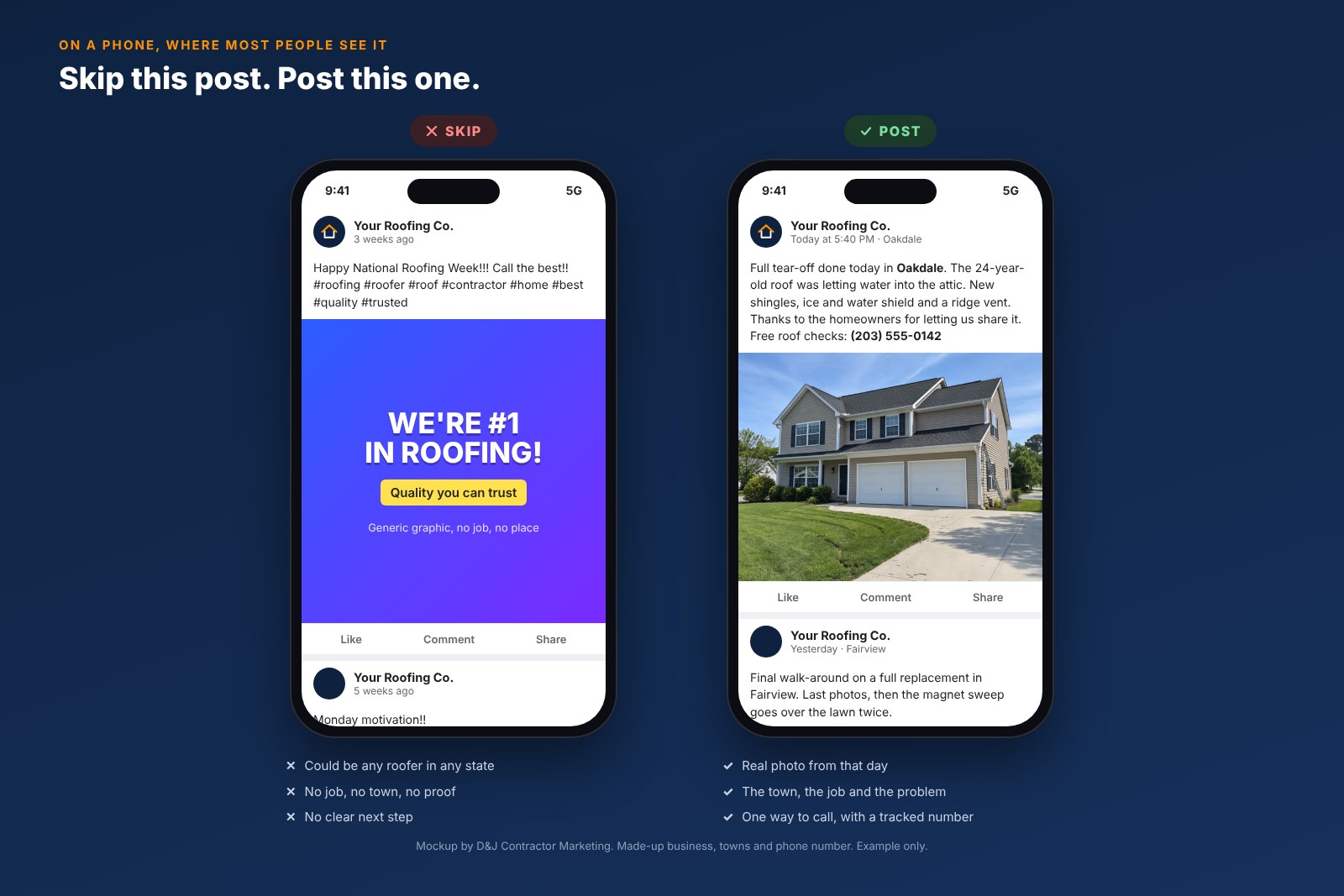
Most contractor posts fail for the same reason. They’re a stock photo with a slogan on top, and they could belong to any company in any state. A good post has a real photo from a real town. It names the problem and the fix, then gives one easy next step.
These are three made-up businesses. Same recipe, three channels: a Facebook post for a roofer, an Instagram post for an HVAC shop and a Google update for a remodeler.
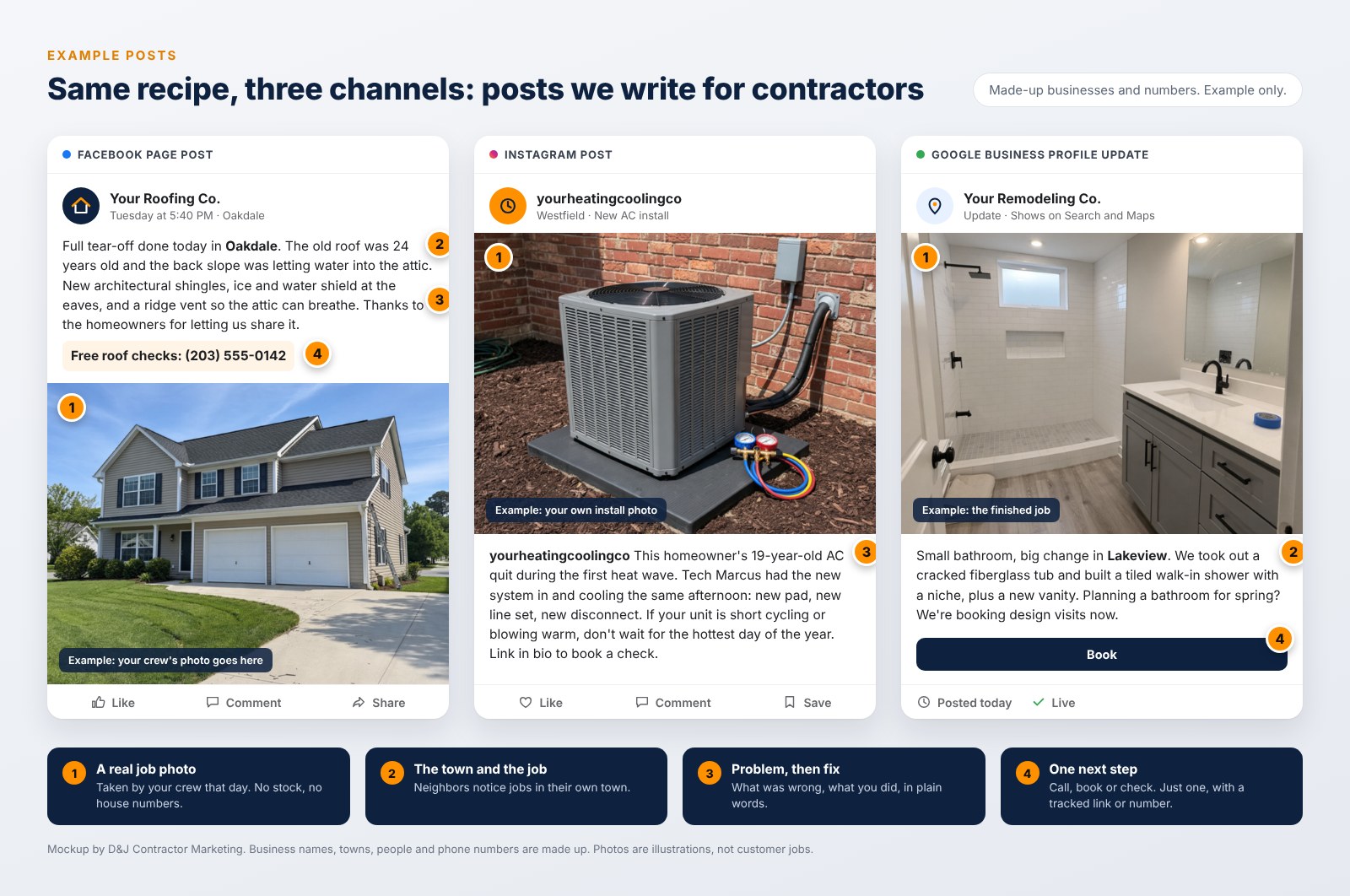
None of them say “Happy Monday!” or carry ten hashtags. Each post tells one short story about one job, in two or three plain sentences.
Here’s the checklist we write every post against:
- A real job photo from your crew. A wide shot works best. If you have two photos, add a close-up of the detail that matters (flashing, a clean line set, the grout).
- The town and the type of job. “Full tear-off in Oakdale” beats “another happy customer.”
- The problem, then the fix, in two or three plain sentences.
- One next step: call, book or request a quote. Not three.
- Nothing private: no house numbers, plates, faces or family photos without a yes from the owner.
Most people see your posts on a phone, so we check every post there before it goes out. This is the difference on a small screen:
What our social media marketing service covers
Each month we write and schedule your posts, answer comments and messages, and send one report on the calls they brought in. Your part is snapping photos on the job.
 Social media posting on Facebook and Instagram
We build a monthly plan around your season and your crew’s schedule, then write and schedule each post. Our usual starting point is 2 to 3 posts a week on Facebook, with Instagram versions where your work is visual. Most of them are real jobs. The rest are quick tips or crew shout-outs, with the odd seasonal reminder.
BuilderBase’s AI can draft a caption, but our team edits each one to sound like you and check the facts against the job. Slow week with no photos? We post a tip, a past job or a review. We rarely use stock, and never as if it were your job.
We publish with BuilderBase, the social media app D&J makes for home service businesses. It posts to Facebook, Instagram and your Google profile from one calendar, and it formats each post for each network. You can see every post before it goes out if you want an approval step.
 Google Business Profile posts and photos
Each week we post at least one update to your Google profile and add fresh job photos. Google reviews every post against its content policy before it goes live, so we keep them clean: no typos, no filler text and only links to your own site. If one shows “Not approved,” we fix and repost it. This work overlaps with our Google Business Profile management, so the two fit together if you use both.
Job photo collection from your crew
Photos are where most social plans stall. Crews are busy, nobody remembers to send photos, and the agency fills the gap with stock photos and memes. So we make sending photos as close to zero effort as we can.
Your crew keeps taking photos the way they already do, and BuilderBase pulls new photos from Google Drive, Dropbox or CompanyCam and turns them into post drafts. No shared folder? Your office can text or email the photos to us instead. We pick the best ones and write the story.
We give your crew a one-page shot list: a wide “before,” a wide “after,” one close-up of the key detail, and the truck or crew when it’s natural. About a minute per job.
 Comments, messages and reviews
A question that sits for three days tells a homeowner you’ll be slow to call back too. We check your comments and messages every business day, answer the simple ones in your voice and send real job requests straight to you or your office. When a review comes in, we reply to that too. If you want reviews to grow faster, our reputation management service adds the asking part.
 Call tracking and reporting
Every link we post carries a tracking tag, so your analytics can tell Facebook visitors from Instagram ones. Where it makes sense, we put a tracked phone number in posts and ads. Your main number stays on your Google profile, so your listings keep matching everywhere. Each month you get one short report built around calls and quote requests. More on that below.
 Answering and booking
Weekend and evening messages wait for the next business morning, unless you add an answering option. If nobody answers until Monday, that job may go to someone else. Our AI receptionist, Restoral, can answer calls and chats and book the job onto your calendar. It works with Google Calendar, Calendly, Cal.com, Jobber and most trade CRMs, and our team sets up the link. If you’d rather have people on the phones, see our page on picking an answering service.
What to post, trade by trade
What works for a roofer flops for a plumber. A new roof is a big, slow decision with a great “after” photo. A drain call is fast, a little gross and nobody wants to see it. So we plan each trade differently.
| Trade | Posts that work | When to push | Skip |
|---|---|---|---|
| Roofing | Wide before and after, tear-off details, storm checks, crew on the roof (with safety gear on) | Early spring and right after a storm in your area | Scary storm photos from other places |
| HVAC | New installs, filter and tune-up tips, “what that noise means” clips | Before the first heat wave and the first cold snap | Close-ups of dirty coils with no story |
| Plumbing | Water heater swaps, “why your drain clogs” tips, a clean finished install | Winter freeze warnings, holidays (kitchen drains) | Gross clog photos. One a year, if it makes a point. |
| Remodeling | Progress series that ends in a reveal, material choices, polls on finishes | January to March, when people plan spring projects | Rendered images passed off as finished work |
| Restoration | Crew and drying gear at work, “what to do in the first hour” tips, mold myths | After big storms and freezes, with care for the people affected | Customers’ damaged rooms or belongings without written OK |
| Landscaping | Seasonal before and after, plant picks, short time-lapse clips | Late winter for booking, fall for cleanups | Photos that show the house number or the neighbor’s yard |
Restoration customers are often having the worst week of their year, so this trade needs the most care. We never post a customer’s home, face or belongings without written permission, and franchise owners also need to follow their brand’s rules on what can be posted. For more on that trade, see our restoration marketing guide.
More ways to get leads: our list of contractor marketing ideas.
The shortcuts we won’t take
Some social media “growth” tricks, like buying fake followers, are now against the law. Others just make you look fake. These are the things we won’t do for you, even if you ask.
We won’t buy followers or likes
The FTC’s rule on reviews and testimonials covers this directly. Under 16 CFR 465.8, it’s illegal to buy fake “indicators of social media influence” that you know or should know are fake, when they make a business look more important than it is. That includes followers from bots and fake accounts. Besides, 5,000 followers from overseas won’t hire a roofer in your town.
We won’t post staff “testimonials” as customer ones
A video of your office manager praising your service is fine if people can tell she works for you. The same FTC rule (section 465.5) says a testimonial from an employee or manager needs a clear note of that relationship when it isn’t already obvious. We label it. And we never write a testimonial for a customer who didn’t give one.
We won’t pass off stock photos as your work
A stock kitchen with the caption “another one done!” is a small lie that homeowners spot fast. If we use a stock image for a tip post, the post doesn’t claim it’s your job.
We won’t post a customer’s home without a yes
We ask you to get a simple OK (a text is fine) before we post a customer’s house. We crop out house numbers and license plates, and we leave people out unless they agreed. And we never tag a customer unless they asked to be tagged.
How we measure social media marketing
Likes don’t pay for trucks. We measure social by what it sends you: calls, quote requests and messages.
Start with the free part. Every link we post gets UTM tags, which are little labels added to the end of a web address. Google’s own help page says to always use utm_source, utm_medium and utm_campaign, and the results then show up in the Traffic acquisition report in Google Analytics. This is the setup we use:
| Where the link goes | utm_source | utm_medium | utm_campaign |
|---|---|---|---|
| Facebook post | social | roof-replacement-spring | |
| Instagram bio link | social | bio | |
| Google Business Profile update | organic | bathroom-remodel-spring | |
| Boosted Facebook post | paid_social | water-heater-fall |
Why those exact words? Google Analytics sorts visits into channels by rule. A medium of “social” lands in Organic Social, anything starting with “paid” from a social site lands in Paid Social, and a medium of exactly “organic” lands in Organic Search, per Google’s default channel group rules. Make up your own labels for both, like fb-page and organic_social, and the visit matches no rule. It lands in a bucket called Unassigned, where you can’t tell it came from Facebook.
Google profile clicks land in Organic Search next to your SEO traffic, so we pull them out by campaign name in the report.
One more catch: Google says it doesn’t provide metrics or click tracking for the social links on your Business Profile. So we don’t rely on those icons for data. We tag the links inside your posts and on your website instead.
Each month you get one page that answers four questions:
- Did people take action? Calls from tracked numbers, quote forms and messages that turned into real job requests.
- Where did they come from? Facebook vs Instagram vs Google, from the UTM tags.
- What did Google send? Calls, direction requests and website clicks from your Google profile.
- Which posts worked? The top three posts by clicks and messages, so we make more like them.
Reach and followers are in there too, but at the bottom. They tell you the page is alive. They don’t tell you it’s working. A page with 400 local followers who call you beats a page with 4,000 strangers.
What the first 90 days look like
Expect about a month of setup and two more before the numbers mean much.
Month 1: Access, cleanup and the photo habit
You give us partner access to your accounts, so you keep ownership. We fix your profiles: hours, service area and a short “about” that names your towns. We set up UTM tags and tracked numbers. Then we hand your crew the shot list and connect your photo folder or CompanyCam.
Month 2: Posting goes live
Posts start on a steady schedule. We test a few kinds of posts (finished jobs, quick tips, crew posts) to see what your local crowd responds to. We also start replying to comments and messages, so nothing sits.
Month 3 and on: Report and adjust
Now there’s enough data to see a pattern. We cut what doesn’t work, do more of what does, and line up the next season’s posts ahead of time. If one post type keeps bringing messages, that’s often the one worth putting a small ad budget behind.
Rather run it yourself? Use BuilderBase
Not ready to hire it out? You can run the same system yourself. We built BuilderBase so owners can handle their own posting from a phone.
It writes your posts with AI, posts them to your Facebook, Instagram and Google profile, and shows you what Google sent you. It also turns new job photos from Google Drive, Dropbox or CompanyCam into post drafts, so the photo problem mostly goes away.
- Standard, $29 a month: 5 channels and 400 posts a month for one person.
- Team, $39 a month: 10 channels, unlimited posts and seats, plus approval steps for your office.
- Pro ($49) and Ultimate ($99): more channels and more AI images and videos for bigger or multi-location shops.
Every plan has a 7-day free trial, and paying yearly saves 20%. Ads aren’t part of any plan; if you boost posts, that budget goes to Meta. If you want something free to start, Meta’s own Meta Business Suite is free and lets you schedule Facebook and Instagram posts and answer messages from one inbox. It just doesn’t cover Google.
Why work with D&J
We work with contractors and home service businesses. When we also run your Google profile, the same team writes your posts, so your hours, services and towns match everywhere. Your posts link to the right service pages, your Google profile matches your Facebook Page, and one report shows it all.
We also make the tool we post with, BuilderBase, so when something about posting bugs our clients, we can change it. On the restoration side, we’ve worked with 30+ SERVPRO franchises and have never lost a SERVPRO client. You can see more on our case studies page.
What to do this week
You can fix the worst problems this week, before you talk to anyone.
- Check who has admin access to your Facebook Page and Instagram. It’s the first thing we look at when a new client comes on, because an ex-employee or an old agency is often the only admin. Fix that first.
- Make your hours and phone number match on Facebook and Google.
- Ask your crew for three photos from each job this week: wide before, wide after, one close-up.
- Post one real job on Facebook and the same job as a Google update, using the checklist above.
- Answer every open comment and message, even the old ones.
Want a second set of eyes? Our free local SEO audit checks your Google profile and website. Want us to look at your social pages too? Bring them to a strategy call.
Social media marketing FAQ
How often should a contractor post on social media?
We start most contractors at two to three Facebook posts a week, Instagram versions when the work is visual, and one Google Business Profile update a week. Three good posts every week will do more than ten in March and none in April. If your crew can’t supply that many photos, post less and keep the quality up.
Does social media actually bring contractors leads?
Mostly as messages and calls from past customers and referrals, plus some new people who find a post. But social works best as proof. People find you on Google or hear your name, then check your page before they call. That’s why we track calls and quote requests with UTM tags and tracked numbers instead of guessing from likes.
Should I boost posts or run ads?
Not on day one. First, post for a month or two and see which posts get messages and clicks. Then put a small budget behind those. Boosting a weak post just pays to show more people something that didn’t work. For leads you need fast, search ads and Local Services Ads usually come first. Ad spend is paid to Meta or Google directly.
Who owns my social media accounts?
You do. We work through partner or admin access you grant, so your Facebook Page, Instagram account and Google profile stay in your name. If you ever leave, you remove our access and keep every post and follower. Check today that you’re listed as an admin on your own page.
Can I post photos of a customer’s home?
Yes, with their OK. We ask you to get a quick text yes. It’s simple and leaves a record. Crop out house numbers, plates and anything personal. Don’t tag customers unless they ask. For restoration and insurance jobs, get written permission and follow any franchise brand rules first.
How much does social media management cost?
It depends on how many channels you need and whether comments, messages and Google posts are included. For a reference point, one agency serving contractors listed Facebook-only management at $199 a month, after a $49 first month, in November 2026. We quote after a short call. To do it yourself, BuilderBase starts at $29 a month.